The operating system for modern golf clubs.
One place to run members, bookings, staff and the day-to-day business. The tee sheet, subscriptions, till and member app share the same records, so nobody keeps their own list.
A 30-minute walkthrough on a working demo club, set up the way your club runs. On a video call, or a visit where it makes sense.
Where the week goes.
Three jobs eat more staff time than anything else at a club. Here’s what changes.
A busy Saturday.
Staffone sheet for members, guests, societies and competitions, with who's paid and who's checked in on every line. Frost delay set from the course, not the office.
Membersbook under the club's real rules from the app, and get the delay before they leave the house.
Visitorssee what's actually free and pay before they arrive.
Renewals.
Staffthe run is prepared before the year starts and held for review, with the exceptions set aside. Card, UK Direct Debit or invoice, member by member, and overdue invoices flagged.
Membersone bill for the family, and a link to pay online if a card fails.
Committeecollected, outstanding and overdue as running numbers, not a reckoning in May.
Guest fees.
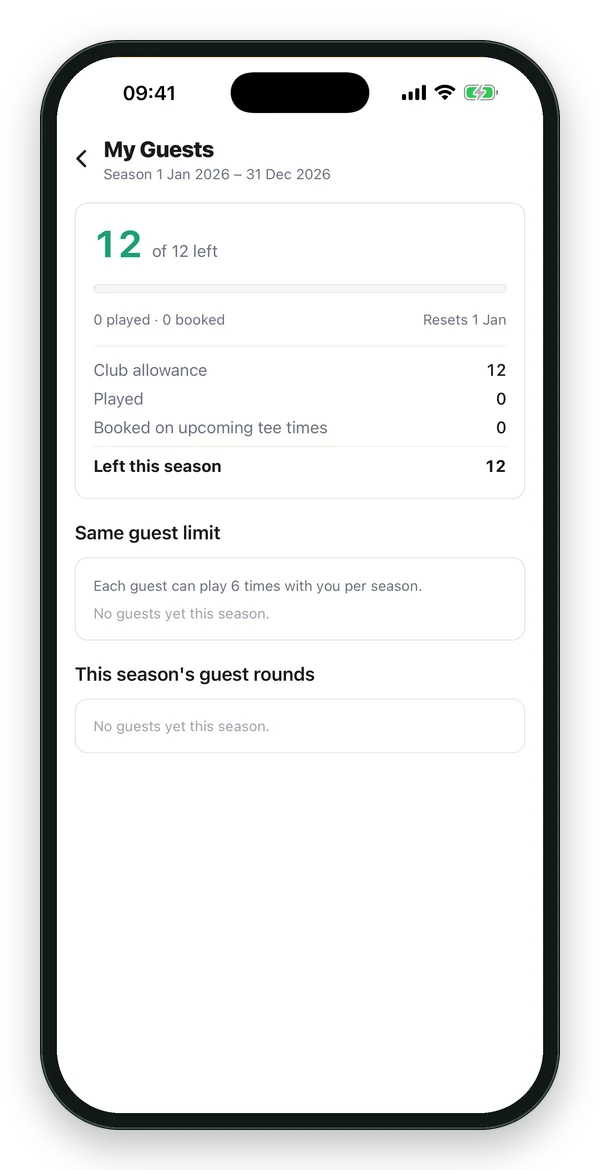
Staffevery guest is booked as someone's guest, counted against that member's allowance, with the day's guest fee on the booking. The club decides how guests pay: the member pays, the guest pays on the day, or we email the guest a payment link.
Memberssee guest rounds left in the app before they book.
Guestswhere the club uses payment links, each guest gets their own by email. Nobody chases it at the bar.
Everyone at the club, in one system.
Pick a part of the club and see what changes for the people who work there.
- Members, visitors, guests and societies on one sheet, with who's paid and who's checked in on every line.
- An unpaid balance shows before the group tees off, and the desk takes it on the card terminal there and then.
- Walk-ins hold a real tee time while they pay, and the bar and the shop run on the same till.
- The renewal run is prepared ahead and held for review, so the office deals with the exceptions, not every member.
- Society and function enquiries each get an owner, a status and a response clock, and deposits are collected by link.
- Collected, outstanding and overdue subs are running numbers the committee can see on any day of the year.
- Lessons are booked and paid for online on the pro's own diary, so the pro stops being the booking system.
- Simulators and range bays sell by the hour or half-hour, priced by time of day, with member rates for regulars.
- Online, phone and walk-in bookings show on one board, and the pro shop till runs on the same system.
- Book under the club's real rules, enter competitions and follow live scores from the member app.
- See guest rounds left before booking a guest, and get a frost delay by push before leaving the house.
- Answer team availability in one tap, spend from a wallet at the bar and shop, and get one bill for the family.
The member app is in pilot on iPhone and Android.
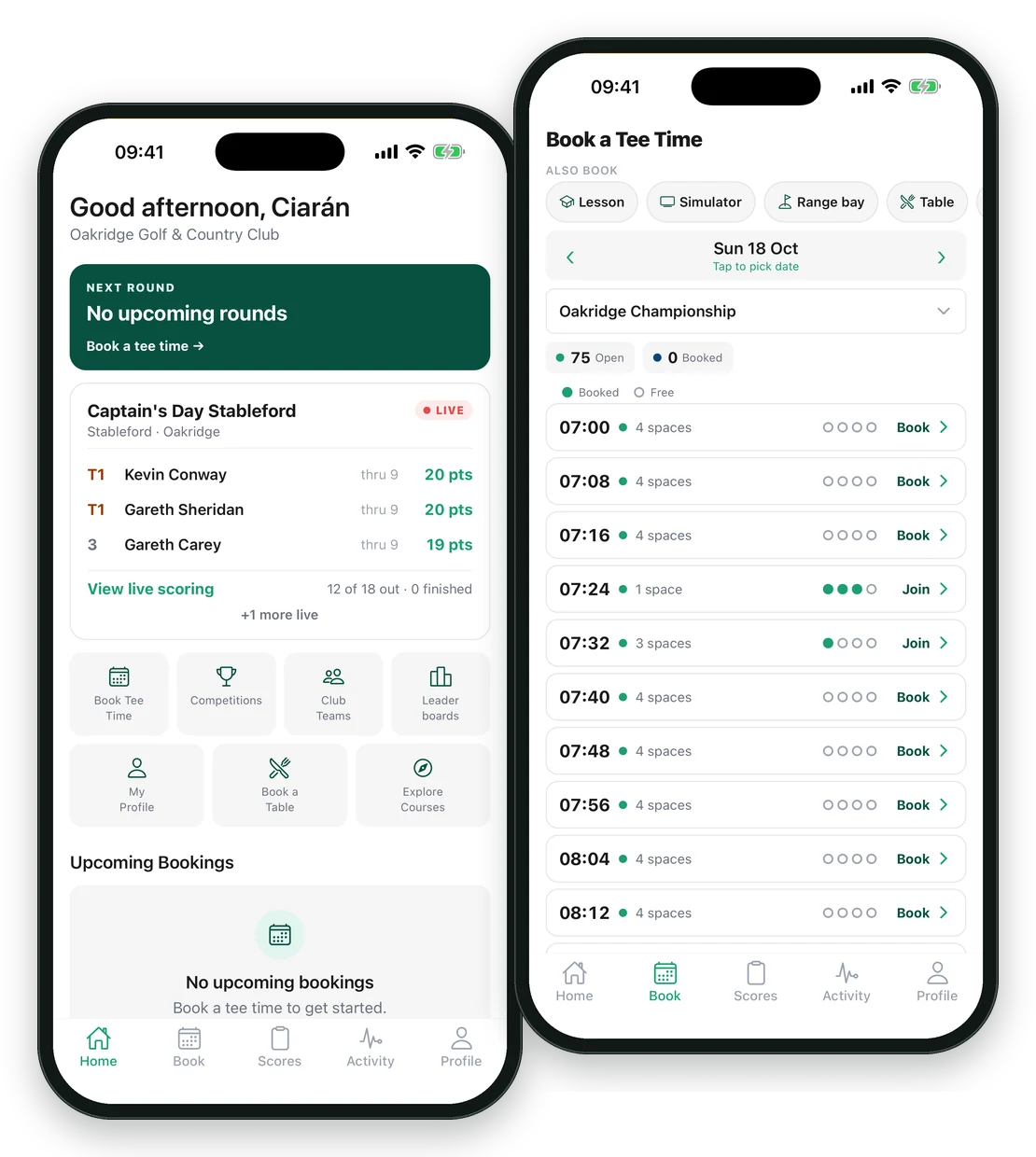
- Visitors see what's actually free on the club's own website and pay before they arrive, with no account needed.
- The club decides how guests pay: the member pays, the guest pays on the day, or the guest gets a payment link by email.
- Society organisers run their own roster and changes on their own page, and each player can pay their share by link.
A Saturday, from first light to last card
Web is the surface of record. Mobile is the surface of the moment. Staff run the club on a desktop and carry it in their pocket. Members never see a desktop. Visitors book on the web without an account, or sign in to the app with a GreenLane Golf account of their own.
Frost on the first three greens Mobile
The greenkeeper sets a delay from the course. Every member with a booking that morning gets a push notification before they leave the house.
Four visitors arrive with a balance outstanding Web
The desk sees the unpaid flag on the booking, takes the balance on the terminal, checks them in and adds two buggies — all on the same record.
A society organiser swaps two players Web
They do it themselves in the organiser portal. The roster, the catering count and the split-payment links update without anyone at the club touching it.
A tour operator asks for four times in October Web
They see only the availability you released, at their tier's rate. The hold expires by itself if the names don't follow. They never see your tee sheet.
Saturday in three weeks is filling fast Mobile
A pricing suggestion arrives with its reasoning. The manager reads it between meetings and approves it from a phone.
The weekly members' competition is live Mobile
Cards come in from the course. The leaderboard updates on members' phones and on the screen above the bar at the same time.
Bar spend lands on the member's record Web
Charged to the wallet at the till. It shows on the same timeline as their subs, their rounds and their competition entries.
The day closes itself Web
Takings reconciled across the tee sheet, the till and online. Two failed subs flagged for Monday. The weekly report is already drafted.
How it works.
A walkthrough.
30 minutes on a video call. You tell us how the club runs, and we show you the same jobs on a working demo club.
A closer look.
A second session with your committee, or a visit to the club, if that helps.
A quote.
Written, for your club, with every module and any migration cost set out.
A 90-day pilot.
We're taking a small number of design-partner clubs. We set the club up with you, bring your data across, and check in through the pilot. There's no obligation to buy.
Bringing members, bookings and history across from your current system is part of the pilot. Migration is a one-off fee, set out in your quote; see Migration.
How pricing works.
One monthly subscription, set by the size of the club. A transaction fee on payments taken through GreenLane, including your own online bookings, subscriptions, society deposits and till payments. Nothing on cash or money you take outside the system. Card processing is charged by Stripe, to your own Stripe account. Every module is in the subscription, with 50 staff logins and more if you ask. No barter and no seat fees. You get a written quote after your walkthrough.
Paying for software in tee times? Here’s how to work out what it costs the club.
Book a walkthrough
A 30-minute walkthrough on a working demo club. On a video call, or a visit where it makes sense. Tell us a little about the club and we’ll be in touch to arrange a time.
- We’ll tell you honestly if we’re not the right fit
- We’ll follow up in writing with a comparison against what you pay today
- Happy to join a call with your committee or board if that helps
The questions clubs actually ask
What does the transaction fee apply to?
Payments taken through GreenLane, including your own online bookings — green fees paid online, membership subscriptions, society deposits and balances, competition entries, and card payments through Counter POS. It doesn't apply to cash, or to money you take outside GreenLane. The rate is set out in your quote and the Order Form your club accepts. Standard card processing fees are charged separately by Stripe and are paid to Stripe, not to us.
Do you connect to WHS handicapping?
Not yet. Handicaps sit on the member's profile and are used for competition scoring, but they are entered by the club or the member rather than pulled from a national handicapping database. A live WHS connection is a goal we are working towards and it is not built today — we would rather tell you that now than have you discover it in month two.
We're a driving range or a simulator venue with no course. Can we set ourselves up?
Yes. Ranges and simulator venues use the same bay booking, lessons diary, till and customer record. The course modules stay switched off. Book a walkthrough and we'll show you your own layout.
We're a resort with several courses. How is that priced?
Every club is quoted for its own venue. Multiple courses, several sites, a large visitor operation, a significant retail and F&B business or custom work all go into the quote, including the transaction rate — so the terms make sense for the size of the operation. Tell us about yours and we'll send you a quote.
Do we have to keep our current website?
No. Keep the site you have and link it to your GreenLane booking page — tee times, lessons, bays, dining and rooms, in your club's colours — so visitors book and pay without leaving your brand. GreenLane club websites are coming soon: a site edited as blocks, with sections that read the club's own tee sheet, results, diary and membership categories, so there is no second copy to keep up to date. Ask us and we'll show you a preview of yours.
How many staff logins do we get?
Fifty as standard, and more whenever you ask, at no charge. We don't sell seats. Everyone who works at the club can have their own account on a role built from their job, so the starter, the greenkeeper, the bar manager and the secretary each see their part of the club and nothing else. That matters beyond convenience: once people share a login, nothing the system records about who did what is true.
Do you take any of our tee times?
No. Not ever. You choose where your tee times are released: through the booking engine on your own website, through your own member app, and — only if you want it — through the GreenLane Golf Marketplace. Nothing is released without you switching it on, and you can withdraw it at any time.
Whose Stripe account does the money go into?
Yours. You connect your own Stripe account during setup, you are the merchant of record, and payouts go straight to the club's bank. We never hold your money.
Can we pay by invoice rather than card?
Yes. Say so when you ask for your quote — and give us a purchase order reference if you have one — and we'll invoice the club rather than take a card.
We're mid-contract with our current provider. Can we still talk?
Yes, and it's worth doing early. Migration takes planning and the closed season is the natural window. We can run alongside your existing system so you're ready to switch the day your contract ends.
Is it an app or a website?
Both, deliberately. There is one app, and what it becomes depends on who signs in — staff, member, caddie, visitor or till operator. Staff also run the club on a desktop console. Societies and tour operators work on the web and never need an account. Visitors can book on your website without an account; if they want to use the app to browse and book across venues, they create a GreenLane Golf account of their own.
Who owns the data?
Two tiers. Your members, and anyone who books through your own booking engine, are the club's data — yours to use and yours to export at any time. Golfers who create their own GreenLane Golf account in the app are not members of any club: that account belongs to GreenLane Golf, and when they book with you we share the details of that booking with you so you can host them. The full position is set out in our terms and privacy notice.
Where is our data held?
On Google Cloud infrastructure, which GreenLane runs the whole platform on. How we handle your data — what we collect, how long we keep it and who processes it — is set out in our privacy notice and in the Data Processing Addendum that forms part of the Subscription Agreement.
See it running with your own tee sheet
Book a walkthrough, or watch the tour first and decide afterwards. The demo commits you to nothing. If you do sign up, it’s a 12-month term that renews annually unless you give 30 days’ notice — set out in full in the Subscription Agreement.
No barter · no trade tee times · no seat fees